Why Your Kubernetes Pods Aren't Scaling Down to 1: Cracking the HPA Algorithm
The HPA Algorithm

Every DevOps engineer knows the thrill of watching Kubernetes scale up effortlessly to meet demand. We set our Horizontal Pod Autoscalers (HPAs) to a target CPU utilization—say, 75%—and marvel as our applications gracefully handle traffic spikes.
But what about the cooldown? What happens when the storm passes, and traffic dwindles? If you're like me, you might have assumed that once usage dips below 75%, your pods would simply scale back down. My recent experience taught me otherwise, revealing a subtle but crucial detail in Kubernetes' scaling logic that completely changed my understanding.
This isn't a story of Kubernetes being broken; it's a deep dive into the intelligent (and often misunderstood) math that governs its scaling decisions.
My "Aha!" Moment: The Scaling Down Conundrum
I had a service running, with an HPA configured to target 75% CPU utilization. When traffic surged, I saw my kubectl get pods output joyfully add new replicas: 1 pod became 2, then 3, then 4. Success!
Later, as load decreased, I watched intently. Usage dropped to 60%... then 50%... and yet, the number of pods remained stubbornly at 2. My initial thought was, "Is the HPA stuck? Why isn't it scaling back to 1 pod?"
This wasn't a bug; it was the elegant, yet often overlooked, mathematical heart of the HPA at work.
The Brains Behind the Brawn: The HPA's Core Algorithm
The Horizontal Pod Autoscaler isn't just a simple "if usage > 75%, add a pod" switch. It continuously evaluates the current state against the desired state using a specific formula. This formula determines the desired number of replicas based on the current metric value (e.g., CPU utilization) and your defined target.
The magic happens with this calculation:

Let's break down each component:
currentReplicas: The number of pods currently running.currentMetricValue: The actual CPU utilization (or other metric) across your pods at this moment.desiredMetricValue: Your target CPU utilization (e.g., 75%).⌈⌉ (Ceiling Function): This is critical! It means "round up to the nearest whole number." You can't have half a pod, so if the calculation results in 1.1, you get 2 pods. If it's 1.9, you still get 2 pods.
Putting the Formula to the Test: My Scenario Explained
Let's revisit my situation.
Initial Setup:
currentReplicas: 2desiredMetricValue: 75%
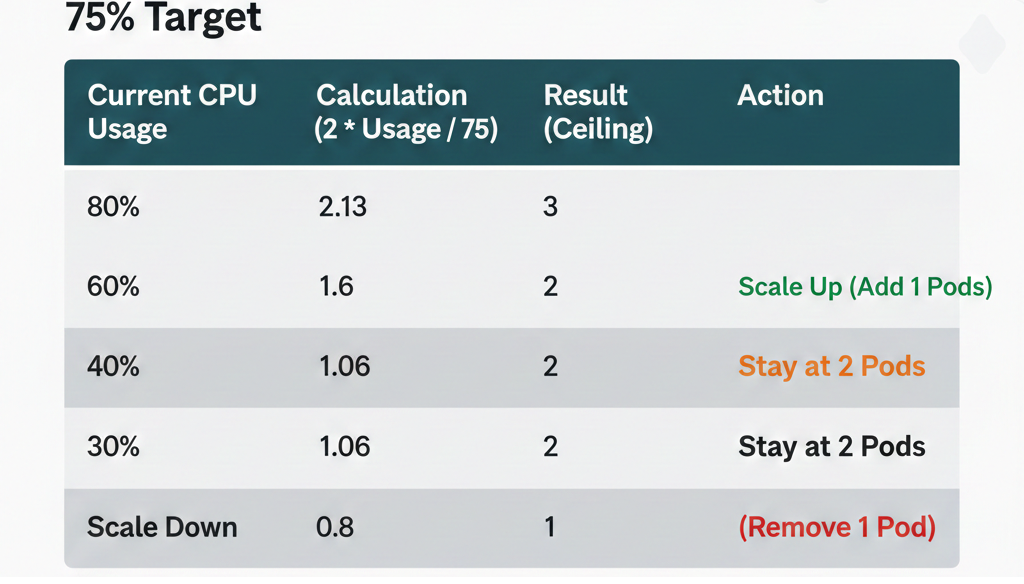
The Observation: CPU usage dropped to 60%. I expected 1 pod. Kubernetes kept 2.
The Calculation:
Let's plug these values into the formula:
desiredReplicas = ceil (2 x 60/75)
= ceil (2 x 0.8 )
= ceil (1.6)
desiredReplicas = 2
The Verdict: Kubernetes correctly calculated that 2 pods were still needed to maintain the desired utilization level, even though the current usage (60%) was below the 75% target.
Beyond the Formula: Downscale Stabilization
The HPA isn't just mathematically precise; it's also designed for stability. Imagine if every tiny dip in traffic immediately triggered a scale-down, only for traffic to spike back up a second later. This "thrashing" would be incredibly inefficient and potentially destabilizing.
To prevent this, Kubernetes implements a downscale stabilization window. By default, this is often set to 5 minutes (--horizontal-pod-autoscaler-downscale-stabilization in the controller manager). This means that even if the HPA's formula determines that fewer replicas are needed, it will wait for a certain period, observing the metrics, before actually terminating any pods. This ensures that the drop in demand is genuine and sustained.
The takeaway is simple
Don't just set your targets and walk away. Dig into the metrics, understand the ceiling function, and respect the stabilization window. By mastering these internals, you can build systems that are not just automated, but truly predictable.
If you found this deep dive helpful, consider following for more Kubernetes 'under-the-hood' explorations. Happy scaling!


